![branded_update_bb_logo_r_230728-2.png]](https://knowledge.benefitbay.com/hs-fs/hubfs/branded_update_bb_logo_r_230728-2.png?width=317&height=95&name=branded_update_bb_logo_r_230728-2.png)
This article will guide you through the steps to lead your new employer group through the Prospect status in benefitbay.
Prospect Status
After you have moved the client to the Prospect status, a new checklist will appear in the Setup tab.
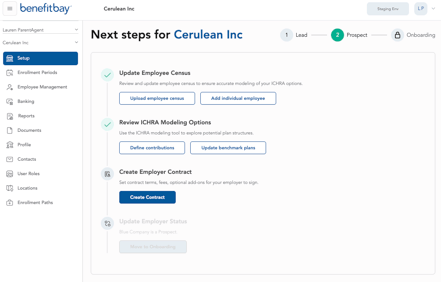
In Prospect status, you have the option to update the employee census, and review/edit the ICHRA model.
However, the most important step available to you in Prospect status is the step of creating an Employer Contract. Benefitbay has a dedicated article about Contract creation, here. Please reach out to your Customer Success Manager with any questions about the Contract.
If you have not yet designated a Signer in the platform, you will see an "Add Signer" button in the top right corner of the Review Contract Setup page. More information about Signers and user roles can be found here.
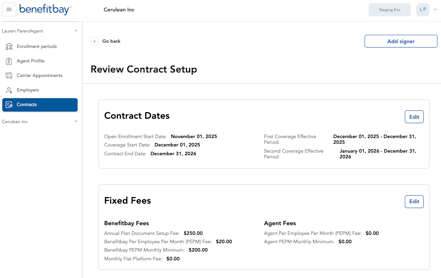
After assigning a Signer, navigate back to the Contract, and click the "Submit for signature" button in the top right corner.

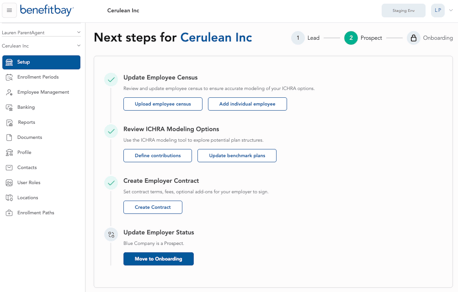
After this step is completed, you can update the Employer Status to Onboarding.
We recommend that you lock in the ICHRA model in the Prospect stage, but it is possible to move the Employer to Onboarding status without a locked model.
Next, read about the Onboarding stage here. You can also read the Employer-facing version of the Onboarding article here.