![BBay Icon Grdnt-2.png]](https://knowledge.benefitbay.com/hs-fs/hubfs/BBay%20Icon%20Grdnt-2.png?width=40&height=40&name=BBay%20Icon%20Grdnt-2.png)
Add Apollo as an Assigned Enroller
To start you will need to assign Apollo as an enroller for the Agency. Go to the Agency 'Enrollment Partners' tab and assign Apollo using the drop down menu.
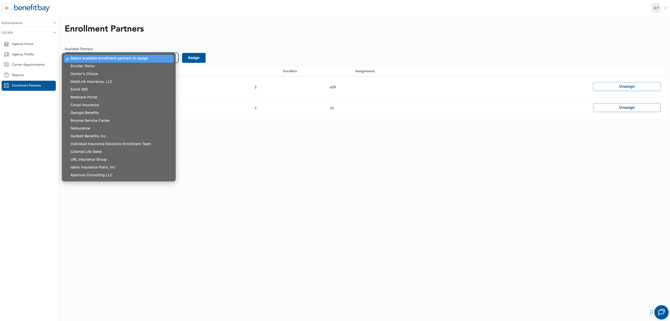
Once they are assigned to the Agency, you will be able to assign them as an enroller to any employer client owned by that Agency. To do this, you will go to the 'enrollment periods' tab of the employer group you want to assign them to.
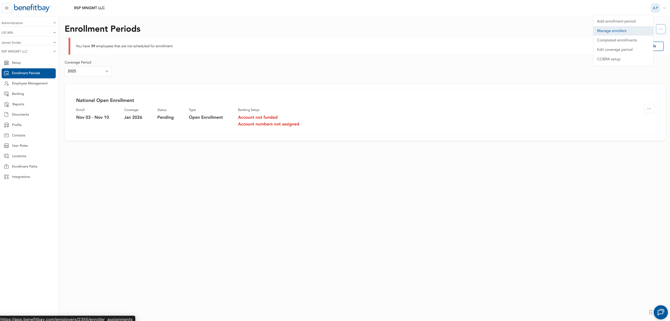
Click the 3-dot menu at the top right of the page and go to 'Manage enrollers'.
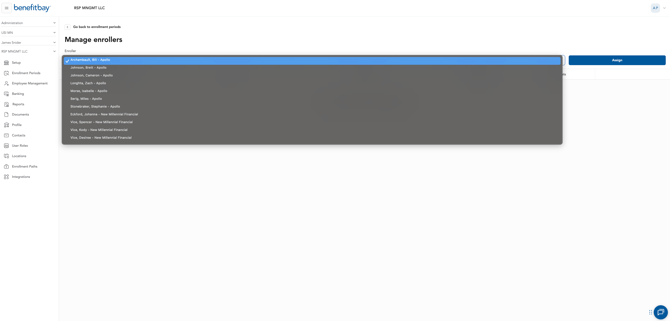
Once you're on the 'Manage enrollers' page, you will assign the Apollo enrollers so they have access to that group. The Apollo enrollers will receive an email alerting them that they've been assigned to this group.
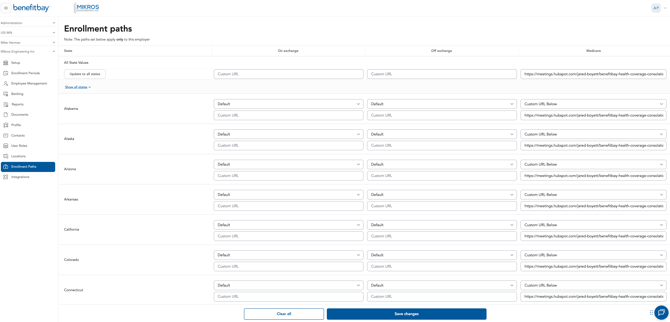
Lastly, you will add Apollo's booking link to the medicare section under the 'enrollment paths' tab. Make sure to apply to all states. Click here for the Calendar link.
Key Contacts:
- Jared Boyett– Sales, Collateral, Adding State Licensing (jboyett@apollo-insurance.com)
- Miles Serig – Junior Partner; oversees the Apollo team, including the Medicare division
(mserig@apollo-insurance.com)
- Bill Archambault – Medicare Manager; handles Medicare operations (billa@apollo-insurance.com)
Benefitbay Specific Phone Number: (816) 282-1687
Next Steps
1. Email Apollo with New Group Information:
Benefitbay CSM will email Bill Archambault and cc Miles Serig at Apollo after assigning a new group with the following information:
-
- New Group Name
- Names of the 65+ employees (if the dependent is Medicare aged but not the EE, please provide the employee they are a dependent of)
- If you provide DOB or other census information password protect the document prior to sending (password: BB-Apollo)
- As of 2026, the year 1961 and older is who will be eligible
- Include additional notes about the group that would be helpful for Apollo to know (e.g., onboarding very last minute, language barrier, not tech savy, etc)
2. Set Up Training with HR:
Apollo will provide a training to all new HR teams to guide them on how to educate and direct medicare aged individuals appropriately. This training is to better prepare the HR team to support their employees and should happen prior to their Open Enrollment.
Schedule this meeting using Bill's booking link: https://meetings.hubspot.com/bill-archambault
3. Provide Educational Documents:
Apollo has provided multiple training documents that are co-branded with benefitbay and Apollo. Please review and utilize the documents that best fit your clients needs.
Documents can be found in the Medicare Apollo folder
Apollo can support all states except Hawaii and Vermont. If your group has Medicare-aged individuals in either of these states, please discuss with your manager on how to proceed.
On-going Service:
- Stacy Le will send Apollo a list of employees turning 65. This list will be sent based off the aging report
- Once a list of eligible employee is received, Apollo will reach out via email. If eligible individuals do not book a call after five days, Apollo will begin to outreach via phone.
- Ongoing Support/Escalations between benefitbay and Apollo will be managed through email. Bill Archambault should be included as a first escalation point.
- Apollo will have access to benefitbay and will assist with payment set up on the supplemental policies they enroll.
- Apollo will load Medicare plan details into benefitbay.
- Apollo will service renewal policies.