![BBay Icon Grdnt-2.png]](https://knowledge.benefitbay.com/hs-fs/hubfs/BBay%20Icon%20Grdnt-2.png?width=40&height=40&name=BBay%20Icon%20Grdnt-2.png)
Important: Ancillary products must be entered into the benefitbay platform before Open Enrollment begins.
The ancillary process includes gathering the required information, preparing a quote, and submitting it to Principal. Principal will return the completed quote to CSM within 5–7 business days, though it may take longer during Open Enrollment. The employer must review and approve the quote, and this approval must be finalized before the contract is signed.
After the employer approves the quote, Principal will complete their onboarding process with the employer (and the agent, if they are not already appointed). After Principal completes their onboarding process, they will provide the required data for platform setup. This step must be completed before the employer can transition out of onboarding.
Receiving a quote request:
Please note: An agent may verbally request a quote rather then clicking the button inside the platform. If this occurs, please select the button to ensure a ticket is created in HubSpot and assign the ticket to yourself. Then move forward to the “preparing a quote section.”
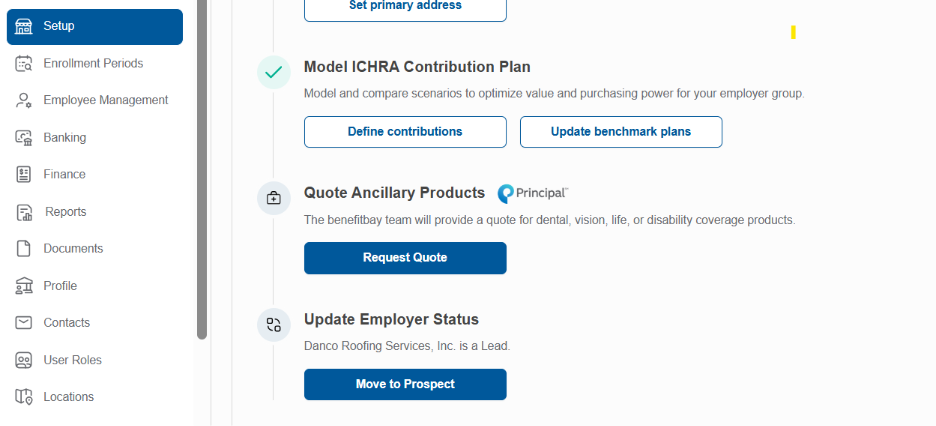
- In the setup tab for the employer client in benefitbay, if the agent would like a quote from Principal (benefitbay ancillary partner), they will select “Request Quote
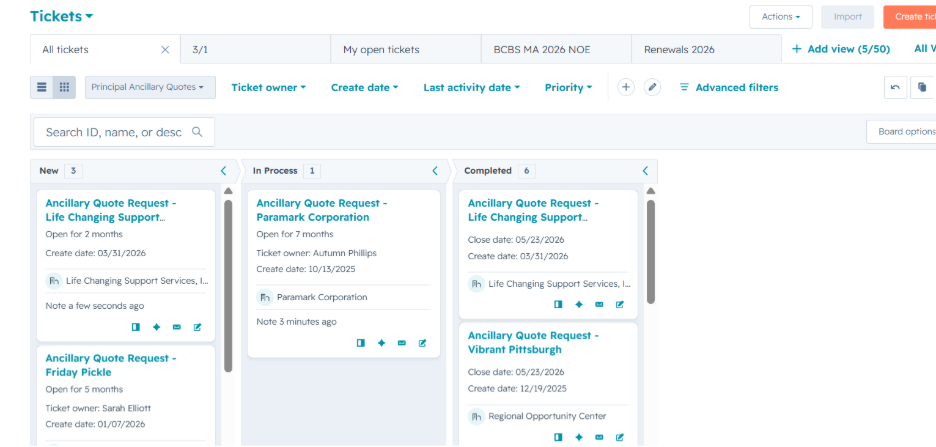
- This will create a ticket in HubSpot in the Principal Ancillary Quotes Pipeline. If the group is not yet assigned to a CSM in benefitbay, it will be left “unassigned” if the group has a CSM assigned in benefitbay, then it will be assigned to that CSM in HubSpot.
Important: Ancillary products must be entered into the benefitbay platform before Open Enrollment begins.
The ancillary process includes gathering the required information, preparing a quote, and submitting it to Principal. Principal will return the completed quote to CSM within 5–7 business days, though it may take longer during Open Enrollment. The employer must review and approve the quote, and this approval must be finalized before the contract is signed.
After the employer approves the quote, Principal will complete their onboarding process with the employer (and the agent, if they are not already appointed). After Principal completes their onboarding process, they will provide the required data for platform setup. This step must be completed before the employer can transition out of onboarding.
Receiving a quote request:
Please note: An agent may verbally request a quote rather then clicking the button inside the platform. If this occurs, please select the button to ensure a ticket is created in HubSpot and assign the ticket to yourself. Then move forward to the “preparing a quote section.”
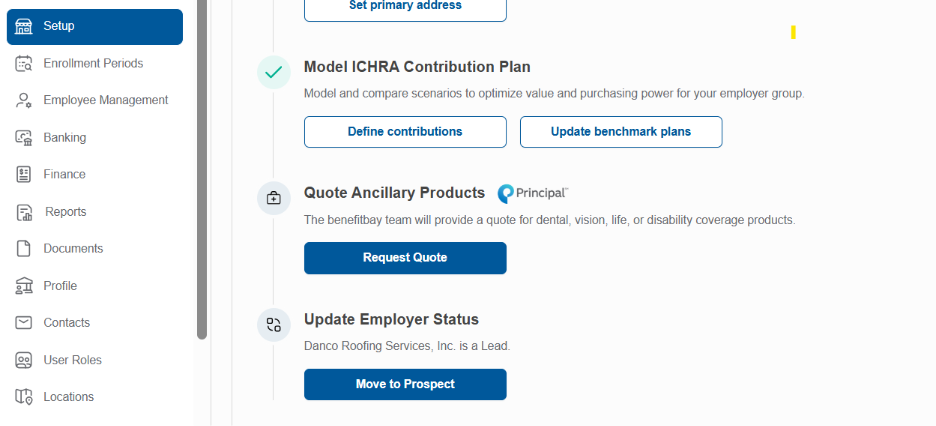
- In the setup tab for the employer client in benefitbay, if the agent would like a quote from Principal (benefitbay ancillary partner), they will select “Request Quote
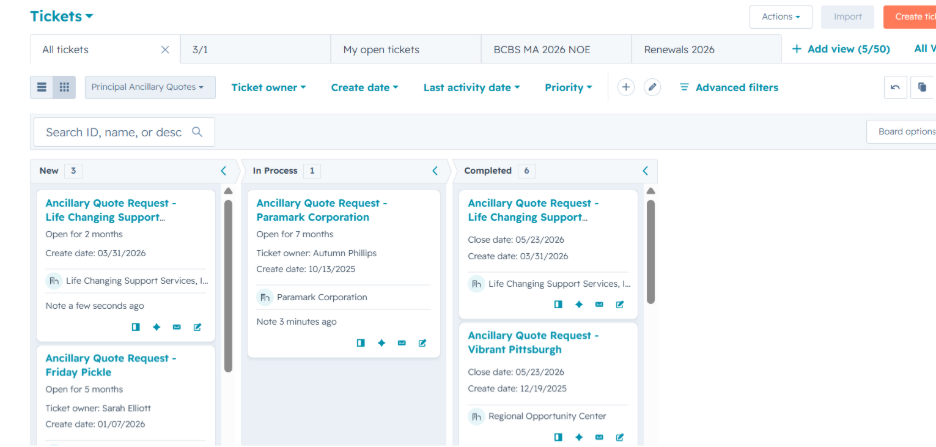
- This will create a ticket in HubSpot in the Principal Ancillary Quotes Pipeline. If the group is not yet assigned to a CSM in benefitbay, it will be left “unassigned” if the group has a CSM assigned in benefitbay, then it will be assigned to that CSM in HubSpot.
Preparing a quote:
- Once a CSM is aware of a quote request, they should immediately began the Request for Proposal (RFP) request. To begin, the CSM will need to contact the agent/employer to determine the types of products requested for quoting. Available products are (send the email template from HubSpot labeled, Principal Quote Discovery”):
- Dental
- Life
- Vision
- Disability, short-term
- Disability, long-term
- Hospital indemnity
- Critical illness
- Accident
- *Please note, only Dental, Life and Vision can be added to the benefitbay platform for enrollment. Any employee shopping during Open Enrollment, will have access to enroll in both ICHRA and ancillary products. The other lines of ancillary coverage will need to be enrolled outside of benefitbay.
- For more information on these products, click here for a copy of the brochure.
- For individual policy brochures, click here to view.
- Once the CSM identifies which products are being requested for a quote, the CSM needs to confirm if the employer wants to contribute to the plans and how much.
- If there are currently ancillary lines in place (takeover group), the agent/employer will need to provide:
- Who is enrolled and the plan details (carrier, plan name, deductible, etc.)
- Current agent commissions (if available)
- Current policy benefits brochure
- Current and renewal rates
- For groups over 200 employees, claims experience is required
- Claims experience is current usage of the benefits of the group
- The agent (or employer if switching agent) can provide these details
- Once the CSM has gathered this data, they will begin the quoting process. The first step is to complete the RFP form. Be sure to save off a copy prior to starting the quote (RFP Form).
- RFP Due Date: be sure to input a date you would like the quote returned
- Legal name of employer group
- Primary address of employer group
- Number of total eligible lives
- Coverage effective date
- Policy anniversary date (beginning of next year, ex. 1/1/2027)
- Commissions- add current agent commissions, if unknown leave blank
- Miscellaneous- leave blank
- Select the lines of coverage to quote, delete any coverage that is not being requested to quote
- Start-up- means it is the first time the benefit is being offered
- Takeover- means the employer is currently offering that benefit
- Non-Contributory- means the employer will pay 100% of the employee’s premiums
- Voluntary- means the employee will pay a portion/all of the premiums
- Once this form is completed. Login to benefitbay and navigate to the employer’s reports tab. Select Principal census report and click download. Be sure to password protect the census then send the form and census and any other data to:
- KSCityRFP@exchange.principal.com
- Cc the following individuals:
- Greg Cain (Cain.Greg@principal.com)
- Trish Pierce (Pierce.Trish@principal.com)
- Jennifer Johnson (Johnson.Jennifer.L@principal.com)
- Cc the following individuals:
- Subject line: RFP REQUEST – GROUP NAME – EFF DATE
- KSCityRFP@exchange.principal.com
- Move the ticket in HubSpot to “In Process”
Installing ancillary coverage:
- Upon receiving the quote back from Principal. Forward the quote details to the agent/employer, in your email include the 'Items to Note' section but remove the 'Principal Highlights & Differentiators' section
- If the group does not want to move forward with the coverage, reply back to the email from the Principal quote and let the team know. If the agent/employer provided details as to why they didn’t want to move forward, you can share those details.
- Move the HubSpot ticket to completed.
- If the group does want to move forward, work with Principal, the agent and employer to complete the onboarding process. Principal will assign an onboarding specialist to help with the process. Every process is different depending on the coverage and if the agent is already appointed with Principal.
- The biggest goal is to get the Principal onboarding completed quickly to ensure the plan details can be added to benefitbay PRIOR to the client moving out of the onboarding status!!!
- Remember, Open Enrollment cannot start until all plans have been entered into the benefitbay platform.
- Once you have the plan details, direct the agent to add the details to the benefitbay platform. Here is an article with instructions on how to complete this task.
- Be sure to tell your Manager that the Principal enrollments that will be part of the enrollment for the group.
- The Manager is responsible for ensuring the Directors of benefitbay Agency are aware of the new enrollment (Assurance, Employee Success, and Strategy and Compliance).
- Once everything is completed, move the ticket to completed in HubSpot.
- Be sure to discuss the ancillary enrollment report and where it’s located on the payroll deduction file.
FAQ:
What if there is an existing client that didn’t add ancillary, but wants to add it for the following year, and they signed a two-year contract?
Answer: The CSM will need to have the client complete an addendum to add the ancillary offering for the next year. Please be sure to start the quoting process early so the policies can be added prior to the start of NOE.
How do the payments for the ancillary plans work?
The client will receive a monthly invoice direct from Principal and will pay it directly to Principal. The policies will NOT be paid from the ARC Account, and no additional funding for the ARC Account will be required.
How will the employer know what the payroll deductions for employees are?
The payroll deduction file will show the ancillary deductions after all the Medical deductions.
Who is responsible for entering the policies in benefitbay?
The agent team should enter the policies into benefitbay prior to enrollment. However, they may need training or assistance to complete it in a timely manner.