![BBay Icon Grdnt-2.png]](https://knowledge.benefitbay.com/hs-fs/hubfs/BBay%20Icon%20Grdnt-2.png?width=40&height=40&name=BBay%20Icon%20Grdnt-2.png)
Original CSM steps
- In the platform, go to ER Profile > Business Information > Switch CSM to new CSM.
- Go to ER Hubspot profile > ensure that pinned note information is correct.
- In Hubspot Profile > bb Delivery Information > switch the Company Owner to new CSM
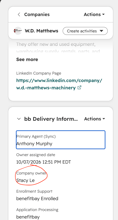
- Schedule a call with new CSM and give them information about the client
- Years with bb, industry, employee population, population details, etc
- Relationship with HR / agent / ownership, etc
- Any outstanding or relevant escalations from the past year
- Where the ER is in their yearly cycle (have all QBRs been done, etc)
- Email the client and agent to let them know of the change.
- Here's an email template to use, as needed:
- I have some exciting news to share—your Customer Success Manager at benefitbay is changing! I’m excited to introduce you to your new go-to person, NEW CSM!
NEW CSM brings a wealth of experience, a passion for helping clients succeed, and a fresh perspective that I know you’ll love. They are already up to speed on your account and will be a great partner for your team moving forward.
Here is their contact information [insert NEW CSM's email and phone]
While NEW CSM will be your point of contact with benefitbay going forward, I’ll be assisting during the transition time to ensure that it goes as smoothly as possible. Feel free to reach out to both NEW CSM and myself for the next few weeks with any questions.
Thank you for being a valued part of the benefitbay family!
- When client and/or agent reaches out with questions, gently point them to the new CSM for the answer (and include the new CSM on your reply.
- Be available for any questions, escalations, etc!
New CSM steps
- In the platform, ensure that the new group is showing up in your Employer tab
- Go to ER Hubspot profile > Copy the pinned note, create a new note + paste the copied information into it. > Upin the old note ("Actions" menu in the right corner of the note)> Pin your new note
- Reach out to former CSM with questions, etc.
- Respond to former CSM introduction email & offer a phone call or meeting, if the ER wants to connect
- Email template, as needed
Thank you for the introduction, FORMER CSM!
EMPLOYER NAME, I'm looking forward to working with you and your team. I’ll be touch soon to schedule your [next QBR or touchpoint], but in the meantime, I would be happy to hop on a short introduction call!
[insert calendar link or phone number here]
- Email template, as needed
- If the ER wants to connect, be sure to schedule ASAP