![branded_update_bb_logo_r_230728-2.png]](https://knowledge.benefitbay.com/hs-fs/hubfs/branded_update_bb_logo_r_230728-2.png?width=234&height=70&name=branded_update_bb_logo_r_230728-2.png)
Reminders for Renewal Employees:
- Action Is Required: Employees with current coverage must log in to benefitbay and complete their enrollment. Auto-renewal (passive renewal) is NOT available. Employees must choose to keep their current plan, select a new plan, or waive coverage.
- No Buyer's Remorse: Once an employee submits a plan and confirms their selection, the selection is final. They will have the same plan through the year unless they are eligible to enroll in a new plan due to a qualifying life event.
- Employee's should schedule only one enrollment meeting at a time. If additional support or research is required, our team will gladly schedule a follow-up call.
- Does your company have Medicare aged employees? Work directly with your agent to schedule employee education sessions.
Use the Hyperlinks below to access detailed information about each task that must be completed during the Renewal process.
September
October
During Open Enrollment (OE)
Please see the below Sections on how to complete each task.
Benefitbay 2027 Contract
- You will be notified when your contract is ready to sign. The company's signer should review and sign the contract once they're notified that it is available.
- Instructions on how to sign the renewal contract here.
- The contract will include terms and conditions, fees, and additional services that have been requested (e.g., 1095 reporting, COBRA, and Ancillary election options).
Review Company Profile
- Review and update your company profile in the benefitbay platform, as needed.
Update Company Contacts
-
Review your company's User Roles on the Contacts tab to ensure everyone has been assigned correctly. The company's "Signer" will be responsible for reviewing and approving the contract and the ICHRA Plan Document. Click here to review user role assignments to ensure each company contact has the correct access.
- Send the general 90-day ICHRA Notice to all benefit-eligible employees. A personalized ICHRA Notice will be available to employees when enrollment begins.
- Here is an email template you can use.
- 90 Day ICHRA notice PDF
For compliance purposes, this notice should be sent to all benefit-eligible employees on or before October 1, 2026.
Census Update Project:
- Download your company census and begin updating it with any employee changes.
If your company uses the payroll integration, you may skip this step!
-
- Here are the instructions to download the census
- Please review and confirm each benefit-eligible employee's personal and income information. Make edits directly into the copy of the census.
- There have been some updates to the census format: Please review the new format guide.
- You may now use the census file to process bulk terminations. Please see instructions here.
- To add new employee information to the census, put the new employee's details at the end of the existing census file. DO NOT INCLUDE A BENEFITBAY ID#; this will be assigned later when the new employee's information is added to the benefitbay platform.
- It is crucial to update all benefit-eligible employee information, especially salaries and personal addresses. This will ensure the ICHRA affordability analysis is accurate.
- Once you have completed the updates, upload the census in the benefitbay platform.
Update your census in benefitbay by October 10, 2026.
Employer Contributions 2027
- Final decisions regarding employer contribution amounts will be made once the applicable rates are released in October (or later, depending on the state). The finalized contribution amounts will be documented in the ICHRA Plan Document. After the updated employee census has been uploaded, please work with your agent to determine and finalize your company's employer contribution amounts for the 2027 plan year.
Renewal Status Tasks
After Open Enrollment dates have been confirmed by you and the employer, your CSM will create a new coverage period for your group, which will switch you into Renewal Status.-
-
- Renewal Status displays a "Setup" checklist of tasks that must be completed before Open Enrollment can begin.
- A complete list of tasks:
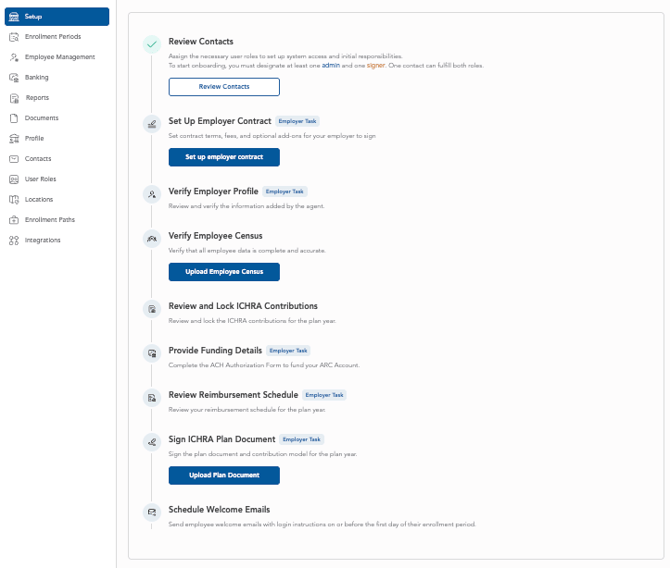
- If you are the Admin user, you will only be able to see the tasks that are marked as "Employer Task" in the image above.
- Find information about all of these "Setup" tasks in this article about Onboarding.
-
- When the 2027 contribution amounts are finalized and your agent has locked the model, the designated "Signer" for the company will log in to benefitbay, sign the contract (if applicable), the locked model, and the 2027 ICHRA Plan Document.
- Here are the instructions to complete this task.
Employee Education
Employee education will ensure a successful Open Enrollment. Work with your agent to schedule Open Enrollment education for all employees. Focus on the following areas:
-
- Employees who currently have coverage must TAKE AN ACTION STEP! There is no option for a passive renewal (or auto re-enrollment). Employees must log in to benefitbay and follow the enrollment steps to either keep their current plan, change plans, or waive coverage.
- Once an employee's application for January 1, 2027 coverage is submitted, no changes can be made to the chosen plan before the new coverage date. It is critical for employees to thoroughly review their selected plan and ensure it meets their needs before clicking the "submit my application" button. There is NO BUYER'S REMORSE!
- Employees should be instructed to schedule only one enrollment call with a benefitbay enrollment counselor. Multiple appointments will restrict access for others who need enrollment counseling during the busy Open Enrollment season. Multiple placeholder calls that are scheduled will be canceled.
- We encourage your Human Resources team to provide employee communication before the start of Open Enrollment.
- Here are templates your team may use.
During Open Enrollment
- You can monitor your company's enrollment progress for all employees. Here are the instructions for this option.
- Review the Renewal Report that highlights employees who had coverage in 2026 but have not actively chosen a plan for 2027. This is a very valuable resource!
- Redirect any employees who have benefitbay platform questions or enrollment questions to support@benefitbay.com.
Renewal Report
-
If your company used benefitbay in the prior year, a Renewal Report will be available for comparison.
-
In benefitbay, go to the Reports tab then Renewal Report and download the CSV file. Then compare Column F to Column M to identify employees who currently have coverage but have not selected coverage for the upcoming year and must take action to continue their coverage.
ALL EMPLOYEES WILL BE REQUIRED TO LOG IN TO BENEFITBAY AND COMPLETE THEIR ENROLLMENT, EVEN IF THEY WANT TO RENEW THE SAME PLAN.