![branded_update_bb_logo_r_230728-2.png]](https://knowledge.benefitbay.com/hs-fs/hubfs/branded_update_bb_logo_r_230728-2.png?width=234&height=70&name=branded_update_bb_logo_r_230728-2.png)
Video Walk-through of the Banking Page
This video walks through all features of the Banking page within benefitbay.
To access the Banking page, login to benefitbay and select the "Banking" tab on the left navigation bar under your company's name
Funding Summary and Projection
Banking Front Page: Projected Cash Flow Summary
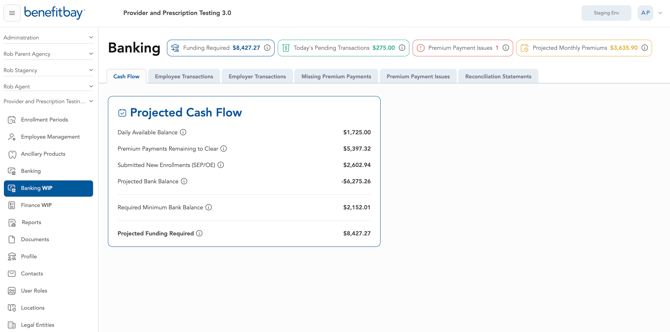
Within the Projected Cash Flow box on the Banking front page, you will see several line items:
- Daily Available Balance - The available balance in the Master ARC Account including posted and pending transactions.
- Premium Payments Remaining to Clear - This amount is the employee premium payments that have not yet been drafted by the carrier and are expected to clear before the next scheduled funding.
- Submitted New Enrollments (SEP/OE) - This amount reflects upcoming premiums for new hires, newly eligible employees, and those with qualifying life events.
- Projected Bank Balance - The projected month end balance is calculated as follows: Daily Bank Balance - Premiums Remaining to Clear - Submitted New Enrollments = Projected Bank Balance at Month End.
- Required Minimum Bank Balance - The minimum balance that must be maintained in the company checking account to help prevent overdrafts that can occur due to fluctuations that occur due to qualifying life-event and new hires (typically 20% of your total premiums).
- Projected Funding Required - The amount needed to cover the coming months premiums. Calculation is as follows: Required Minimum Bank Balance - Projected Bank Balance = Projected Funding Required.
- Today's Pending Transactions - The total of pending transactions in the premium checking account.
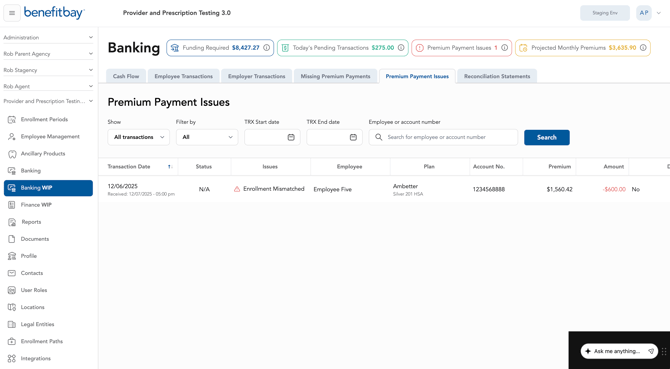
- Premium Payment Issues - Transaction amounts that do not reflect amounts the established coverage premium. Our team is working with the carrier or employee to determine the cause of the variance.
- Projected Monthly Premiums - The total expected premium payments for the employee population for the coming month, based on that current point-in-time. This projection may change as terminations occur or plan selections are updated for new hires and QLEs.
Next month's funding projection
Next month's funding is calculated at a set point in time. Once the funding amount is locked, the employer contact using the 'Finance' label will be emailed the funding amount. This will allow your team to properly support the payment of employee premium.
Since funds fluctuate throughout the month, we highly encourage your financial team to monitor this amount between the 7th and 10th of the month.
AUTOMATIC ACH DRAFTS WILL OCCUR BETWEEN THE 10TH AND 15TH OF EACH MONTH.
Banking Page Tabs: Reports and Documents
Beyond the Cash Flow tab, the Banking page contains six other tabs that contain helpful reports.
- Employee Transactions - this report will show all the transactions that carriers have drafted for employee premiums, click here to learn more on how to view/filter this report.
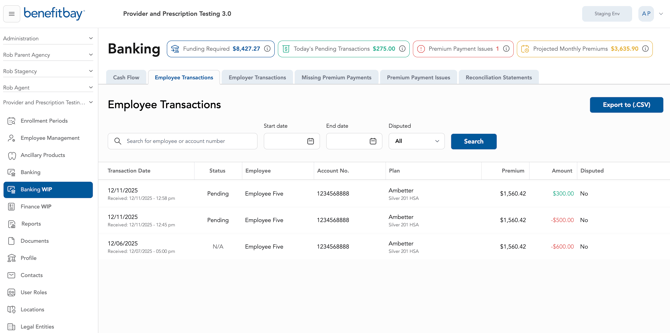
- Employer Transactions - this report will show all the transactions related directly to the Master ARC Account, but not correlated to an employee
- Most of the time, these transactions are deposits to your account (every once in a while, if the carrier/bank doesn't record an employee return (credit) properly, you could see the return here)
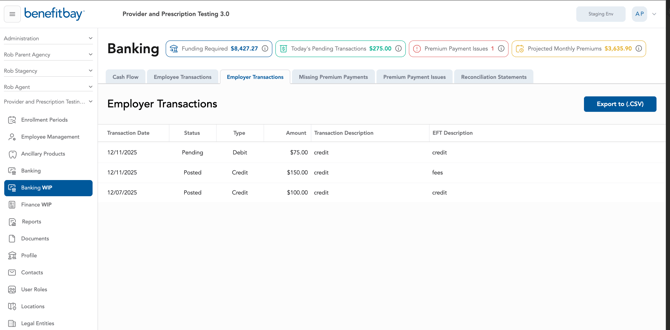
- Missing Premium Payments - this report will show all the missing payments for the employee(s) of the company. This report is a tool our support utilizes to help monitor premium payments. This report is for viewing information, but no action is needed.
- Premium Payment Issues - Any premium amounts that are mismatched, duplicate, or for terminated employees will be flagged as 'premium payment issues'. These issues are tracked and serviced by the benefitbay team on a daily basis. Visibility into issues allows you as the employer to quickly identify any reconciliation issues.
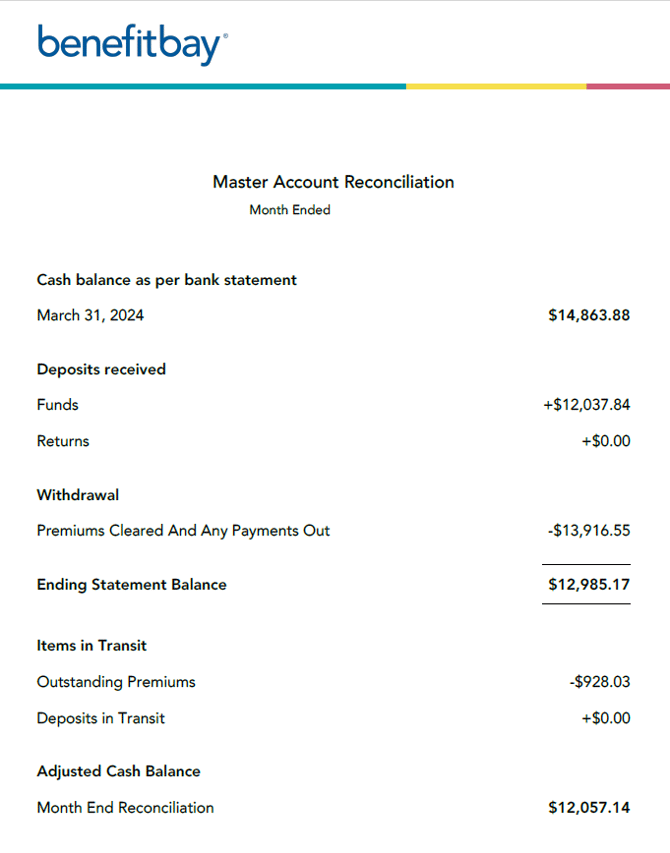
- Reconciliation Statement - this document will provide the summary of the monthly deposits/withdraws from the ARC Account. It also provides a beginning and ending balance each month. This document can be saved/downloaded for your company's financial records.
- Bank Statements - You may update the year using the selection option in the top-right corner. Each statement is organized by month. For each month, you can download the First Premier Bank statement, which includes the account summary for that month.