![branded_update_bb_logo_r_230728-2.png]](https://knowledge.benefitbay.com/hs-fs/hubfs/branded_update_bb_logo_r_230728-2.png?width=317&height=95&name=branded_update_bb_logo_r_230728-2.png)
We are pleased to help you offer an exceptional medical insurance renewal experience for your ICHRA clients. Below is an overview of the renewal process. Your benefitbay Customer Success Manager (CSM) will work with you every step of the way to ensure you have a successful renewal season!
September 2026:
- Begin creating renewal contracts for employers who have confirmed they will be renewing (click here for instructions on how to create your contracts)
- Discuss renewal timelines, process changes, employer contributions, and optional add-on benefits during your meetings. Add-ons include:
- Ancillary elections in benefitbay
- 1095 filing
- COBRA
- All renewing employer contracts, including selection of add-ons, must be created and signed by the employer by September 30, 2026.
- Ask each employer to review and update their company profile and contacts in the benefitbay platform to ensure the information is current.
- For Employers with Medicare-aged employees: Confirm the selection of a Medicare enrollment partner and assist your employer with scheduling employee education sessions.
- For your reference, here is a list of approved benefitbay Medicare enrollment partners.
- Remind employers to send the general 90-day ICHRA Notice to all benefit-eligible employees by October 1, 2026. A personalized ICHRA Notice will be available to employees when enrollment begins.
- Here is an email template that employers can use, including a downloadable PDF of the 90-day ICHRA notice.
For compliance purposes, the 90-day ICHRA notice should be sent on or before October 1, 2026.
October 2026:
- Once your employer has updated their employee census, you or the employer should upload it to the benefitbay platform. Click here for the instructions.
- To determine 2027 ICHRA contribution amounts and ensure affordability requirements are met, use the benefitbay FULCRUM tool to model the employee census data.
- Please reach out to your Customer Success Manager (CSM) for guidance in remodeling the contribution.
- The benefitbay team strongly recommends transitioning groups with multi-year age banded contributions to a single-age model.
- Resources for contribution modeling can be found here.
- After Open Enrollment dates have been confirmed by you and the employer, your CSM will create a new coverage period for the employer, which will switch the employer into Renewal Status.
- Renewal Status displays a checklist of tasks that must be completed before Open Enrollment can begin.
- A complete list of tasks:
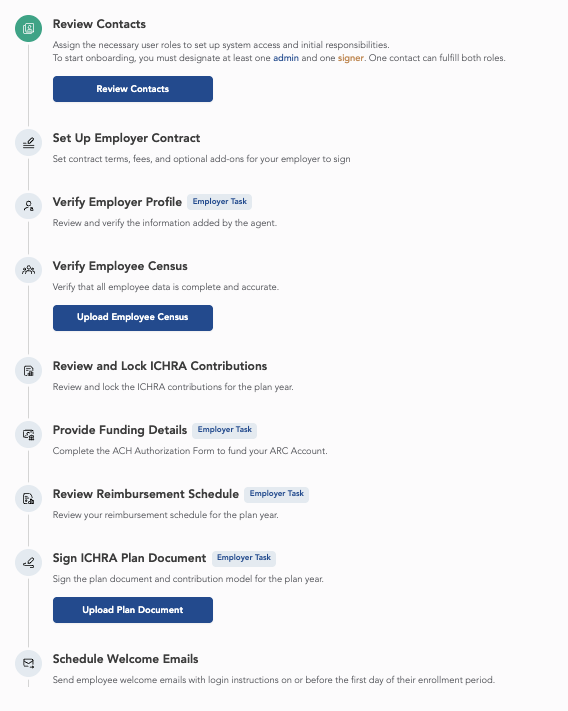
- Find information about all of these tasks in the article about the Onboarding Status here.
- There are four Agent-only tasks that you must complete.
- Verify Employee Census
- Create Contract (if applicable)
- If an employer is contracted through 2027, they will not be required to complete a new contract.
- If the employer's contract ends in 2026, we will require them to sign a new contract.
- You can find instructions on how to create a contract, here.
- Review and Lock ICHRA Contributions
- Once the 2027 contribution model is agreed upon, lock the model.
- The employer's Signer must log in to benefitbay to sign the Reimbursement Schedule, 2027 ICHRA Plan Document, and if applicable, the 2027 contract.
- All other Employer tasks can be completed by an Admin user.
- Schedule employee education for Open Enrollment.
- Employees who currently have coverage must TAKE AN ACTION STEP! There is no option for a passive renewal (or auto-reenrollment). Employees must log into benefitbay and follow the enrollment steps to either keep their current plan or change plans
- Employees who had coverage in 2026, and wish to waive coverage for 2027 will be required to call their carrier in December and cancel their coverage effective 12/31/26.
- Employees who change carriers will likewise be required to call their 2026 carrier in December and cancel their coverage effective 12/31/26
- After an employee's application for January 1, 2026 coverage is submitted, no changes can be made to the chosen plan before the new coverage date. It is critical for employees to thoroughly review their selected plan and ensure it meets their needs before clicking the "Submit My Application" button.
- Employees should be instructed to schedule only one enrollment call with a benefitbay enrollment counselor. Multiple appointments will restrict access for others who need enrollment counseling during the busy Open Enrollment season.
November and December 2026:
- Ensure that all employees are adequately prepared for Open Enrollment, and confirm that all employee emails to be sent via the benefitbay platform have been scheduled for delivery.
- Assist employers with monitoring their enrollment progress.
ALL EMPLOYEES WILL BE REQUIRED TO LOG IN TO BENEFITBAY AND COMPLETE THE ENROLLMENT, EVEN IF THEY WANT TO RENEW THE SAME PLAN
Congratulations! You've made it!